Wedding Gift Laser Cut File: Creating Flawless Keepsakes Without the Guesswork
The moment a couple says "yes" is fleeting, but the physical memento of that event should last a lifetime. For creators and small business owners, offering a Wedding Gift Laser Cut File is not just about selling a digital product; it is about providing the blueprint for a cherished memory. However, the gap between downloading a vector file and producing a stunning, professional-grade 3D sign is often wider than beginners anticipate. Many enthusiasts rush into cutting without understanding the nuances of layering, material compatibility, or design integrity, leading to wasted materials and frustrated customers.
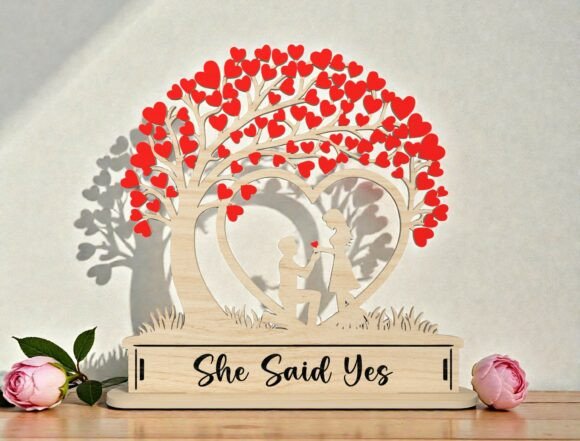
Understanding how to properly utilize designs like the “She Said Yes” Proposal Tree SVG requires more than just a laser cutter. It demands an eye for detail and a respect for the technical constraints of your machine. Whether you are using a Glowforge, xTool, OmTech, or a traditional blade cutter like Cricut or Silhouette, the principles of precision remain the same. This guide explores common pitfalls in working with layered wedding décor files and offers practical solutions to ensure your final product is as magical as the proposal itself.
Misunderstanding Layer Depth and Material Thickness
One of the most frequent errors when working with a 3D layered proposal tree sign is assuming that all materials behave the same way. A design intended for 3mm acrylic may look completely different when cut from 4mm plywood. The depth of the shadow lines, the fit of the interlocking tabs, and the overall visual weight of the piece depend heavily on precise material thickness.
When users ignore these specifications, they often encounter two major issues: parts that are too loose and fall apart, or parts that are too tight and crack during assembly. For instance, if you are creating a heart-shaped tree filled with love leaves, using wood that is slightly thicker than the design tolerance can cause the delicate leaf layers to bow or warp. This compromises the clean, flat aesthetic that makes laser-cut art appealing.
The Better Approach: Always test-fit your first cut with scrap material of the exact type and thickness you intend to use for the final product. If you are selling these as personalized wedding gifts, specify the recommended material thickness in your product description. Educate your buyers that deviation from the suggested 3mm or 1/8-inch standard may require manual sanding or adjustment. This proactive communication reduces returns and builds trust with your audience.
Overlooking Vector Cleanliness and Node Optimization
Not all digital downloads are created equal. A common mistake among beginners is purchasing or downloading a Wedding Gift Laser Cut File without inspecting the vector paths first. Poorly optimized files may contain open paths, duplicate lines, or excessive nodes. While these issues might be invisible on a screen, they are disastrous for laser cutters.
Duplicate lines cause the laser to cut the same path twice, resulting in burnt edges, widened kerfs, and potentially ruining the delicate silhouette of the couple. Open paths can cause the machine to skip sections entirely, leaving your engagement announcement incomplete. For complex designs like the “She Said Yes” text layer combined with intricate tree branches, these errors are magnified.
The Solution: Before sending any file to your machine, open it in your preferred software (LightBurn, Illustrator, or Inkscape) and run a "clean up" or "optimize path" function. Check for closed shapes and ensure that no two lines overlap unnecessarily. If you are a designer creating these files, take the time to weld and unite shapes properly. Providing clean, ready-to-cut vector paths in formats like SVG, DXF, and AI ensures that your customers have a smooth experience, regardless of their skill level.
Neglecting the Assembly Process in Design
A beautiful design on paper does not always translate to a buildable object. Many creators focus so much on the visual appeal of the romantic 3D layered design that they forget the human element: assembly. A complex proposal tree with dozens of tiny leaves and a detailed couple silhouette can become a nightmare to glue if the alignment markers are missing or unclear.
Without proper registration marks or dowel holes, aligning multiple layers of wood or acrylic is incredibly difficult. Misaligned layers create a messy, amateurish look that detracts from the sentimental value of the gift. This is particularly problematic for bridal shower décor or anniversary gifts where presentation is paramount.
Practical Advice: Incorporate subtle alignment guides into your design. Small notches, dowel holes, or distinct corner markers can make the assembly process intuitive. When listing your product, include a brief assembly guide or a link to a video tutorial. Showing potential buyers that you have considered the ease of construction adds significant value to your digital download. It transforms a simple file into a comprehensive crafting experience.
Choosing the Wrong File Format for Your Machine
While most modern laser cutters accept a variety of inputs, assuming universal compatibility is a risk. A file formatted strictly for a specific brand’s proprietary software might not translate well to generic G-code generators. Conversely, raster images disguised as vectors can lead to engraving instead of cutting, wasting hours of machine time.
For those using Cricut or Silhouette machines for layered paper or vinyl projects, the need for true vector data is even more critical. These machines rely on precise path data to cut intricate shapes like the heart-shaped tree couple silhouette. A low-resolution PDF or a pixel-based image will result in jagged edges and failed cuts.
What to Check: Ensure that the Wedding Gift Laser Cut File package includes multiple formats such as SVG, DXF, DWG, EPS, AI, and PDF. Verify that the SVGs are saved as pure vectors, not embedded images. If you are a buyer, check the file preview comments or description to confirm compatibility with your specific hardware. If you are a seller, label your files clearly (e.g., "Glowforge Ready," "Cricut Compatible") to help users make the right choice instantly.
Failing to Personalize the Emotional Connection
Finally, a technical success can still feel emotionally hollow if the personalization aspect is overlooked. The power of a proposal tree lies in its specificity. A generic "She Said Yes" sign is nice, but a sign that incorporates the couple’s names, the date, or a specific location coordinate is unforgettable. Many creators stop at the base design, missing the opportunity to offer customization services.
By offering to edit the text layer or add custom elements before sending the file, you elevate your service from a commodity to a bespoke experience. This is especially relevant for marriage proposals and engagement announcements where uniqueness is valued.
Final Thought: Treat every project as a collaboration. Whether you are cutting for yourself or for a client, take the time to review the design for both mechanical feasibility and emotional resonance. Check the kerf width, verify the layer order, and ensure the message is clear. By avoiding these common mistakes and focusing on precision and personalization, you turn a simple digital download into a timeless heirloom. The goal is not just to cut wood or acrylic, but to craft a tangible symbol of love that stands the test of time.